# Level Up Your DDEV Game ## Best Practices and Hidden Features TYPO3 Developer Days 2025 André Buchmann \ TWT Group GmbH <!-- .slide: data-background="_assets/t3dd25_background.jpg" --> --- ## The Speaker <div class="container fifty-fifty"> <div class="col">  </div> <div class="col"> **André Buchmann** - Software Engineer\ TWT Group GmbH - TYPO3 Developer since 2017 - TYPO3 Translation Handling Initiative member - Two foster children </div> </div> notes: - 100% remote - Interests: - Programming - Dogs - Farming --- ## Once upon a Time... - Founded by Drud - Hosting company aiming to rival Platform.sh - Local dev CLI tool became DDEV - Make dev workflow easier - Freeing senior devs from environment troubleshooting - Randy Fay - Lead Developer - Supported by Drud --- ## What is DDEV? - Go application - Orchestrate Docker / docker-compose - Native support for PHP & Node.js - Cross-platform support (macOS, Linux, Windows, GitHub Codespaces) - Blueprints for many CMS - Local domains with SSL-certificates (`mkcert`) - Helpful community ([Discord](https://ddev.com/s/discord)) --- ## What I Love about DDEV: - Open Source - Easy setup and configuration - Reliable development space - Fast onboarding for teams - Run multiple projects parallel - Powerful extensibility notes: - Learn best practices from real-world projects - Discover hidden gems of DDEV --- ## Best Practices Let's get to know DDEV! --- ## My Home is my Castle Prevent permission issues: Put your project in a subdirectory of your home directory! <div> On WSL2 work inside the subsystem. </div><!-- .element: class="fragment" --> --- ## Structure ```bash .ddev ├── addon-metadata # DDEV Addons ├── apache # Webserver config (apache) ├── commands # Custom commands grouped by host or container (web, db, ...) ├── db_snapshots # Database backups ├── db-build # Customize db docker image ├── homeadditions # Copied to web container's home directory (.bash_aliases) ├── mutagen # Mutagen sync config ├── mysql # MySQL/MariaDB config ├── nginx_full # Webserver config (nginx) ├── php # PHP config (*.ini) ├── providers # Recepies for pulling/pushing data from/to hosting providers ├── traefik # Router config (project level) ├── web-build # Customize web docker image ├── web-entrypoint.d # Custom scripts to run on web container startup ├── xhprof # xhprof config └── config.yaml # Main configuration file ``` --- ## Config: Global vs. Project <div class="container fifty-fifty"> <div class="col"> **Global** - Settings apply to all projects - `~/.ddev/global_config.yaml` - **Not** in version control - User-specific environment variables - Personal access token for GitLab provider - Global credentials </div><!-- .element: class="fragment" --> <div class="col"> **Project** - Project specific settings - `.ddev/config.yaml` - In version control (Git) - Overrides global config </div><!-- .element: class="fragment" --> </div> --- ### Additional Project Config Files `.ddev/config.*.yaml` - Automatic include - Split your configuration for easy maintenance - Exclusion from version control possible - Addons may add additional config files note: Examples: - config.local.yaml - config.solr.yaml --- ## Environment Variables Places to define environment variables: <div> - `.ddev/.env.web` (DDEV v1.23.5+) - `.ddev/.env` - `.ddev/config.yaml > web_environment` - `~/.ddev/global_config.yaml > web_environment` </div><!-- .element: class="fragment" --> Order: First overrides Last \ Changes: Restart required <!-- .element: class="fragment" --> Applications may support additional .env files <!-- .element: class="fragment" --> note: [Read more](https://ddev.readthedocs.io/en/stable/users/extend/customization-extendibility/#environment-variables-for-containers-and-services) --- ### Environment Variable CLI Commands <div> [`ddev dotenv`](https://ddev.readthedocs.io/en/stable/users/usage/commands/#dotenv) ```bash # write ddev dotenv set <file> --my-env "My Value" # read ddev dotenv get <file> --my-env ``` </div><!-- .element: class="fragment" --> <div> [`ddev config`](https://ddev.readthedocs.io/en/stable/users/usage/commands/#config) ```bash # set ddev config --web-environment="MY_ENV=My Value,SOMEENV=someval" ddev config global --web-environment="MY_ENV=My Value,SOMEENV=someval" # append ddev config --web-environment-add="FOO=bar,BAZ=baz" ddev config global --web-environment-add="FOO=bar,BAZ=baz" ``` </div><!-- .element: class="fragment" --> --- ### One Push. Eternal Shame. > Secrets in Git are easy to find \ > — and hard to remove. Never commit credentials note: Version Control ≠ Secret Storage Secrets don't belong in version control. Ever. Git blame will find you. Don’t let your name be on that commit. --- ## Hooked on Automation Run your commands before/after DDEV commands with hooks. - Install dependencies on startup - Migrate database after import ```yaml # .ddev/config.yaml or .ddev/config.hooks.yaml hooks: post-start: - exec: composer install - exec: npm ci - exec: npm run build:production - exec-host: ddev solrctl apply - exec: typo3 database:updateschema -n post-import-db: - exec: typo3 database:updateschema -n - exec: typo3 cache:flush -n - exec: typo3 backend:user:create -u admin -p Password.1 -e admin@example.com -a -m -n - exec: mysql -udb -pdb db < .ddev/post-import.sql service: db ``` --- ### Hooks - pre/post-start - pre/post-stop - pre/post-import-db - pre/post-import-files - pre/post-composer - pre/post-config - pre/post-exec - ... [Hooks Documentation](https://ddev.readthedocs.io/en/stable/users/configuration/hooks/) --- ### Hook Tasks - `exec` to execute a command in any service/container. - `exec-host` to execute a command on the host. - `composer` to execute a Composer command in the web container. Exit on error: `fail_on_hook_fail: true`\ (project / global config) <!-- .element: class="fragment" --> --- ## Take a Snapshot Backup and restore your local database. - Backup: `ddev snapshot` - Folder: `.ddev/db_snapshots` - Restore: `ddev snapshot restore` <div> Need to change your setup? \ Backup all projects in one command: \ `ddev snapshot --all` </div><!-- .element: class="fragment" --> note: - Colima breaking update: snapshot --all saved the day - easy testing of database migrations - switch between docker providers - `mariabackup` or `xtrabackup` command --- ## Providers - Sync database & user-generated files - Recipies consists of several (optional) tasks: \ `auth_command`, `db_pull_command`, `db_import_command`, ... - Pull: fetch data from remote - Push: deploy from local to remote ```bash # fetch ddev pull <filename> (--skip-db --skip-files --skip-import) # deploy ddev push <filename> (--skip-db --skip-files) ``` --- ### GitLab Provider Get database dump & files via GitLab package registry <div class="container"> <div class="col"> #### + Pros + One-Click update data & files + No dumps in Git + No SSH access needed + Access control by GitLab </div><!-- .element: class="fragment" --> <div class="col"> #### - Cons - CI/CD setup for dump job - Personal Access Token </div><!-- .element: class="fragment" --> </div> --- #### `.ddev/providers/gitlab.yaml` ```yaml[11-15|17-26|28-35|37-45|47-53] # TYPO3 GitLab data provider # This will pull the database and files from GitLab packages. You may need to execute the dump-job first in GitLab. ##################### ### CONFIGURATION ### ##################### # In the environment_variables section you need to define the GitLab project id and the package tag version. # The webroot is relative to your ddev entry point (see working_dir in .ddev/config.yaml). environment_variables: GITLAB_DOMAIN: gitlab.com PACKAGE_NAME: site PACKAGE_VERSION: 1.0.0 PROJECT_ID: 12345 auth_command: command: | set -eu -o pipefail echo "Pulling dump from GitLab..." if [ -z "${GITLAB_COM_PAT:-}" ]; then echo "Please make sure you have set the GITLAB_COM_PAT environment variable. You need to create a personal access token with scope 'read_api' here: https://${GITLAB_DOMAIN}/-/user_settings/personal_access_tokens . Add it globally to ddev: 'ddev config global --web-environment=\"GITLAB_COM_PAT=<TOKEN>\"' and restart the project." && exit 1; fi VALIDATION_RESPONSE=$(curl --silent --write-out "%{http_code}" --output /dev/null --request GET --header "PRIVATE-TOKEN: ${GITLAB_COM_PAT}" --url "https://${GITLAB_DOMAIN}/api/v4/personal_access_tokens/self") [ "$VALIDATION_RESPONSE" -eq 401 ] && echo "Error: Unauthorized. The provided GitLab Personal Access Token is invalid, does not have the required permissions or is expired. Please check here: https://${GITLAB_DOMAIN}/-/user_settings/personal_access_tokens" && exit 1 [ "$VALIDATION_RESPONSE" -eq 404 ] && echo "Error: Not Found. The token does not exist." && exit 1 [ "$VALIDATION_RESPONSE" -ne 200 ] && echo "Error: Unexpected response from GitLab API [HTTP $VALIDATION_RESPONSE]." && exit 1 echo "GitLab authentication: OK" db_pull_command: command: | # set -x # You can enable bash debugging output by uncommenting set -eu -o pipefail mkdir -p /var/www/html/.ddev/.downloads pushd /var/www/html/.ddev/.downloads >/dev/null curl --header "PRIVATE-TOKEN: ${GITLAB_COM_PAT}" https://${GITLAB_DOMAIN}/api/v4/projects/${PROJECT_ID}/packages/generic/${PACKAGE_NAME}/${PACKAGE_VERSION}/db.sql.gz -o /var/www/html/.ddev/.downloads/db.sql.gz service: web files_pull_command: command: | # set -x # You can enable bash debugging output by uncommenting set -eu -o pipefail ls /var/www/html/.ddev >/dev/null # This just refreshes stale NFS if possible mkdir -p /var/www/html/.ddev/.downloads pushd /var/www/html/.ddev/.downloads >/dev/null curl --header "PRIVATE-TOKEN: ${GITLAB_COM_PAT}" https://${GITLAB_DOMAIN}/api/v4/projects/${PROJECT_ID}/packages/generic/${PACKAGE_NAME}/${PACKAGE_VERSION}/files.zip -o /var/www/html/.ddev/.downloads/files.zip service: web files_import_command: command: | # set -x # You can enable bash debugging output by uncommenting set -eu -o pipefail unzip /var/www/html/.ddev/.downloads/files.zip -d ${DDEV_DOCROOT}/ rm /var/www/html/.ddev/.downloads/files.zip service: web ``` ```bash ddev config global --web-environment-add="GITLAB_COM_PAT=<TOKEN>" ddev pull gitlab ``` --- ## Add-ons Ready-made services & tools: <div class="container"> <div class="col"> - Solr - Redis - Vite - PhpMyAdmin - RabbitMQ - ... </div> <div class="col"> ```bash # list ddev add-on list --all ddev add-on list --installed # install ddev add-on get ddev/ddev-redis # uninstall ddev add-on remove ddev/ddev-redis ``` </div> </div> Discover more: [addons.ddev.com](https://addons.ddev.com/) --- ## [Custom Commands](https://ddev.readthedocs.io/en/stable/users/extend/custom-commands/) Places to put your command files: - `.ddev/commands/host` - `.ddev/commands/<containername>` - `~/.ddev/commands` (globally) ```bash #!/usr/bin/env bash ## Description: Hello World Example ## Usage: hello ## Example: "ddev hello" echo "Hello World!" ``` <small>File: `.ddev/commands/web/hello-world.sh`</small> --- ## Inside Job - Execute your commands inside ddev - Host versions of PHP, NodeJS, ... may differ from container - Software may not be installed on every host --- ## Hidden Gems You Might Have Missed Let’s dive deeper! note: @TODO: - what is PAGER? https://ddev.readthedocs.io/en/stable/users/extend/in-container-configuration/#using-pager-inside-containers - `ddev xdebug on` for step debugging - `ddev logs` for troubleshooting - [Exposing a Node.js App Over HTTP / HTTPS on a Subdomain in DDEV](https://ddev.com/blog/ddev-expose-node-app-on-subdomain/) - [Solving Intel-only AMD64/X64 problems on macOS with Apple Silicon](https://ddev.com/blog/amd64-with-rosetta-on-macos/) - [Using DDEV to spin up a legacy PHP application](https://ddev.com/blog/legacy-projects-with-unsupported-php-and-mysql-using-ddev/) - [How to Downgrade Terminus in DDEV's Web Container and Customize Other Bundled Tools](https://ddev.com/blog/ddev-bundled-tools-using-custom-versions/) - https://www.velir.com/ideas/2024/05/13/how-to-run-headless-drupal-and-nextjs-on-ddev - https://ddev.readthedocs.io/en/stable/users/usage/faq/#communicate-with-database-of-other-project - https://blog.bitexpert.de/blog/ddev_share_volume - Custom imagemagick installation - Generic webserver for python/other --- ## Autocomplete Install autocomplete for your shell: * bash * fish * powershell * zsh ```shell # see detail instructions for your shell ddev complete <bash|fish|powershell|zsh> --help # Example for zsh: # Linux: ddev completion zsh > "${fpath[1]}/_ddev" # macOS: ddev completion zsh > $(brew --prefix)/share/zsh/site-functions/_ddev ``` note: automatically installed during DDEV setup --- ## DROP DATABASE db No need for a database in your project? ```yaml # .ddev/config.yaml omit_containers: [db] ``` <div> Removable default containers: * Projects: `db`, `ddev-ssh-agent` * Globally: `ddev-router`, `ddev-ssh-agent` </div><!-- .element: class="fragment" --> note: - use case: frontend component library --- ## [Communication between projects](https://ddev.readthedocs.io/en/stable/users/usage/faq/#can-different-projects-communicate-with-each-other) Access `db` of other project form `web` container: \ `mysql -h ddev-<projectname>-db` Communicate via HTTP/S \ <small>(web container A to web container B)</small> <div class="container"> <div class="col"> ```shell ## hostname curl https://ddev-<projectname>-web ``` </div> <div class="col"> ```shell ## FQDN curl https://<projectname>.ddev.site ``` ```yaml # .ddev/docker-compose.communicate.yaml # allows connection to other project services: web: external_links: - "ddev-router:<projectname>.ddev.site" ``` </div> </div> note: external_links need to be defined on both sides --- ## Composer Application located in a Subfolder? `ddev typo3` command not found? \ DDEV can't locate your vendor/bin <div class="container"> <div class="col"> ```txt Project root ├─ .ddev/ ├─ app/ │ ├── composer.json │ ├── public/ │ └── vendor/ └── frontend/ ``` </div><!-- .element: class="fragment" --> <div class="col"> Solution: define `composer_root` ```yaml # .ddev/config.yaml composer_root: app docroot: app/public ``` </div><!-- .element: class="fragment" --> </div> --- ## Database Migration * MySQL <-> MariaDB * Postgres not supported * Only `db` database `ddev debug migrate-database mariadb:11.4` note: Migrate a MySQL or MariaDB database to a different `dbtype:dbversion`. Works only with MySQL and MariaDB, not with PostgreSQL. It will export your database, create a snapshot, destroy your current database, and import into the new database type. It only migrates the ‘db’ database. It will update the database version in your project’s `config.yaml` file. --- ## PHP Locales DDEV v1.24.0+ ships only few common locales: <div class="container"> <div class="col"> - de_AT.utf8 - de_DE.utf8 - en_CA.utf8 - en_GB.utf8 - en_US.utf8 - es_ES.utf8 - es_MX.utf8 </div> <div class="col"> - fr_CA.utf8 - fr_FR.utf8 - ja_JP.utf8 - pt_BR.utf8 - pt_PT.utf8 - ru_RU.utf8 </div> </div> <div> Enable all locales: ```yaml # .ddev/config.yaml webimage_extra_packages: ["locales-all"] ``` </div><!-- .element: class="fragment" --> note: PR: https://github.com/ddev/ddev/pull/6570 --- ## DNS & Offline Mode - Online with public DNS - `*.ddev.site` resolves to `127.0.0.1` - Disable DNS - Set `use_dns_when_possible: false` in `.ddev/config.yaml` - Creates entries in `/etc/hosts` - Administrative privileges required - Local DNS - `dnsmasq` with wildcard A to `127.0.0.1` - [Offline usage](https://ddev.readthedocs.io/en/stable/users/usage/offline/) --- ## Quick Peek Share a link to your local DDEV instance - Command: `ddev share` - External service: [ngrok](https://ngrok.com/) - Test on mobile device - Share with coworker/client in a meeting Define static domain: ```yaml # .ddev/config.yaml ngrok_args: --domain my-domain.ngrok-free.app ``` note: - temporarily - external service registration needed --- ## Never Change a Running System - Update regularly - Get new features - Cleanup old docker images --- ## MacOS: Mutagen - Faster file sync - Better Performance - Case-sensitive file handling 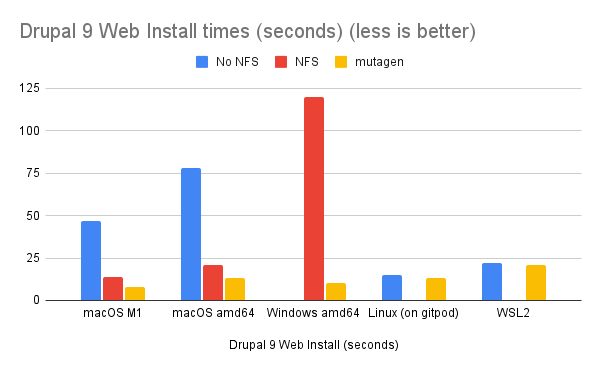 --- ## Windows Installer With new GUI in DDEV 1.24.7+ 1. Install WSL2 2. Download DDEV Windows installer from [GitHub Releases](https://github.com/ddev/ddev/releases) 3. Run installer <div class="container"> <div class="col"> ```shell wsl --install # Reboot wsl --install Ubuntu --name DDEV # WSL2 with Docker CE and specified distro ./ddev_windows_amd64_installer.exe /S /docker-ce /distro=DDEV ``` </div> <div class="col"> 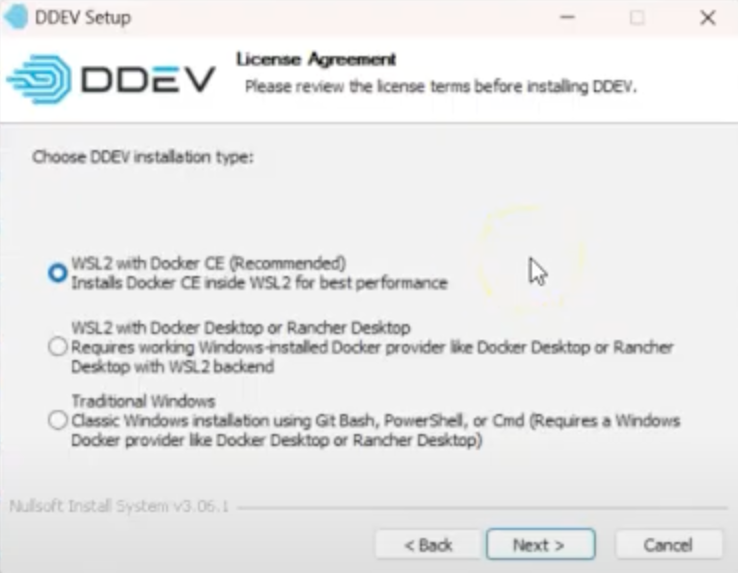 </div> </div> note: - name is just a suggestion - winget install ddev not working correctly currently --- ## Bonus Gems Shortcuts for common commands: ```bash alias ds='ddev start' alias dr='ddev restart' alias drm='ddev rm' alias dpo='ddev poweroff' alias dsh='ddev ssh' alias das='ddev auth ssh' # TYPO3 alias dt='ddev typo3' alias dtc='ddev typo3 cache:flush' # <-- Most used ;-) alias dtu='ddev typo3 database:updateschema' # composer alias dci='ddev composer install' alias dcu='ddev composer update' alias dcr='ddev composer req' # launch alias dlt='ddev launch typo3' # Open TYPO3 Backend in Browser alias dlm='ddev launch -m'. # Open Mailpit in Browser # provider alias dpg='ddev pull gitlab -y' # xdebug alias dx='ddev xdebug' alias dxo='ddev xdebug off' ``` --- ## Takeaway - Stay up to date - Automate repetitive tasks - Learn from the community\ Discord: https://ddev.com/s/discord note: - automate with hooks, commands, add-ons --- ## Thank YOU! Let’s keep leveling up together! What’s your favorite trick? \ Share your secret gems. <!-- .slide: data-background="_assets/t3dd25_background.jpg" --> --- ## André Buchmann TWT Group GmbH \ andre.buchmann@twt.de Slides: https://slides.schliesser.dev/t3dd25 \ TYPO3-Slack: @schliesser <!-- .slide: data-background="_assets/t3dd25_background.jpg" -->